
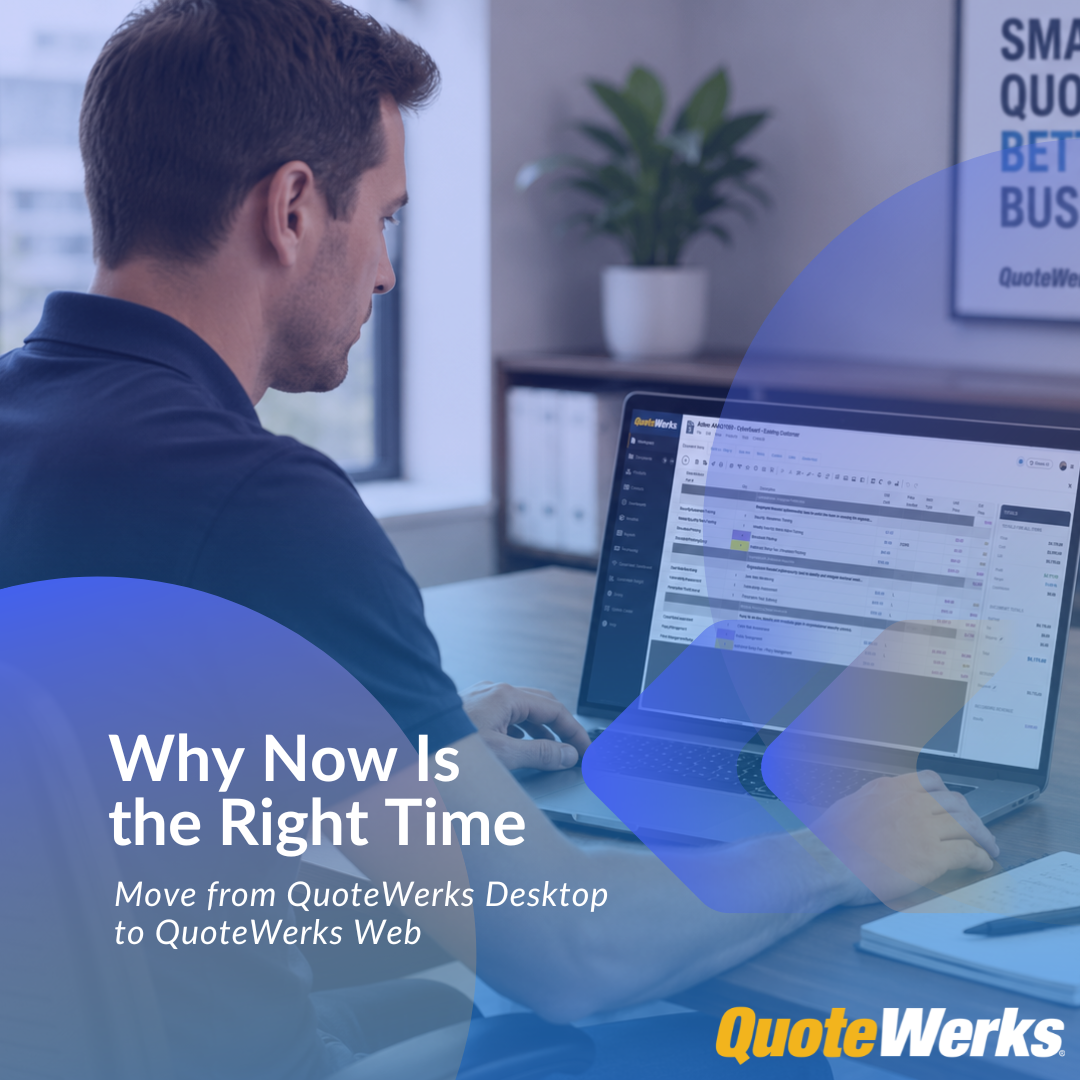
For many QuoteWerks Desktop customers, the decision to stay on Desktop has not been accidental.
You stayed because it works.
Your product database is built. Your pricing logic is defined. Your quote templates are familiar. Your team knows the workflow. Your customer history, revisions, integrations, and internal processes are already part of how your business sells.
That investment matters.
So when the topic of moving to a browser-based quoting platform comes up, the concern is usually not whether the Web is useful. The concern is whether the move will create unnecessary disruption.
Will we have to rebuild everything?
Will we lose historical quotes?
Will our team need to relearn the entire process?
Will Desktop stop being available?
The answer is no.
QuoteWerks Web is not a forced replacement for QuoteWerks Desktop. It is a practical next step for customers who want to modernize their quoting process while keeping the QuoteWerks foundation they already rely on.
And now, for many companies, the timing is right.
QuoteWerks Web has reached feature parity for the core quoting workflows most customers rely on every day, while also adding Web-only capabilities that are not available in a traditional Desktop-only environment.
That changes the conversation.
The question is no longer simply:
“Should we look at QuoteWerks Web someday?”
The better question is:
“Where does QuoteWerks Web now fit into the way our team quotes, sells, and manages customer opportunities?”
Why Some Customers Waited
For a long time, many QuoteWerks Desktop customers had good reasons to wait before moving more of their quoting process to the Web.
Desktop worked well. Teams were trained. Templates were already built. Product data, pricing rules, layouts, reports, CRM integrations, accounting workflows, and internal processes were already in place.
For many companies, QuoteWerks Desktop was not just quoting software. It was part of the sales operations backbone.
Some customers also relied on workflows that were closely tied to installed software, including desktop-based accounting systems, desktop-based CRMs, third-party integrations built around the QuoteWerks Desktop API, or administrative processes that were already well established.
Those were valid reasons to be cautious.
But waiting and doing nothing are no longer the same thing.
QuoteWerks Web has matured. The feature set has expanded. Core quoting workflows have reached parity for the day-to-day needs of most teams. And QuoteWerks Web now gives Desktop customers a practical way to modernize without throwing away what already works.
That is why now is different.
QuoteWerks Web Has Reached Core Workflow Parity and Moved Beyond It
One of the most important reasons to revisit QuoteWerks Web now is that it has reached feature parity with QuoteWerks Desktop for the core quoting workflows most customers rely on every day.
That matters.
For years, some Desktop customers viewed QuoteWerks Web as something to monitor, evaluate, or use selectively. It offered browser-based access and new flexibility, but many businesses still viewed Desktop as the center of their quoting process.
QuoteWerks Web is now ready for a broader role.
Existing Desktop customers can use QuoteWerks Web as a serious operational path forward, not just a limited browser-based companion.
But the bigger point is that QuoteWerks Web is no longer only about matching Desktop functionality. It also adds Web-only and Web-first capabilities that help modern sales teams work faster, connect systems more easily, and reduce administrative friction.
These include:
- Familiar Desktop-style interface option with a matching toolbar experience
- Modern Web interface for users who want a newer, cleaner UI
- Browser-based access
- Rich text formatting
- AI-powered Paste Special
- AI-assisted scripting
- Outbound webhooks
- REST and OData API access
- Settings Search across more than 500 settings
- Centralized Email Template Manager
- Enhanced image support
- Azure AD / Entra ID single sign-on
- Faster Web Layout Designer experience
- Exchange rate updating
- Hide and reorder workbook tabs
That combination changes the migration conversation.
The question is no longer:
“What will we lose if we move from Desktop to Web?”
The better question is:
“What new capabilities do we gain by moving more of our quoting process into QuoteWerks Web?”
For many customers, that is the real “why now.”
Two Interfaces: Familiar When You Need It, Modern When You Are Ready
Moving from Desktop to Web should not mean forcing every user to relearn QuoteWerks overnight.
That is why QuoteWerks Web supports two user experiences.
For existing QuoteWerks Desktop users, QuoteWerks Web includes a familiar interface option designed to make the transition easier. It preserves a workflow and toolbar experience that more closely matches QuoteWerks Desktop, helping experienced users feel comfortable as they begin working in the browser.
This was intentional.
Many long-time customers have years of muscle memory built around QuoteWerks Desktop. They know where common actions are. They understand the quoting flow. They can move quickly because the interface is familiar.
For those users, the familiar QuoteWerks Web experience helps reduce training friction and makes the move to Web feel like a natural extension of the Desktop environment rather than a completely new system.
At the same time, QuoteWerks Web also gives users access to a newer, more modern interface.
This modern Web interface reflects what many customers have been asking for: a cleaner, more current user experience that feels at home in the browser. It gives QuoteWerks the ability to deliver a modern UI in a way that is practical for Web users, while still supporting the familiarity existing Desktop customers depend on.
That gives teams flexibility.
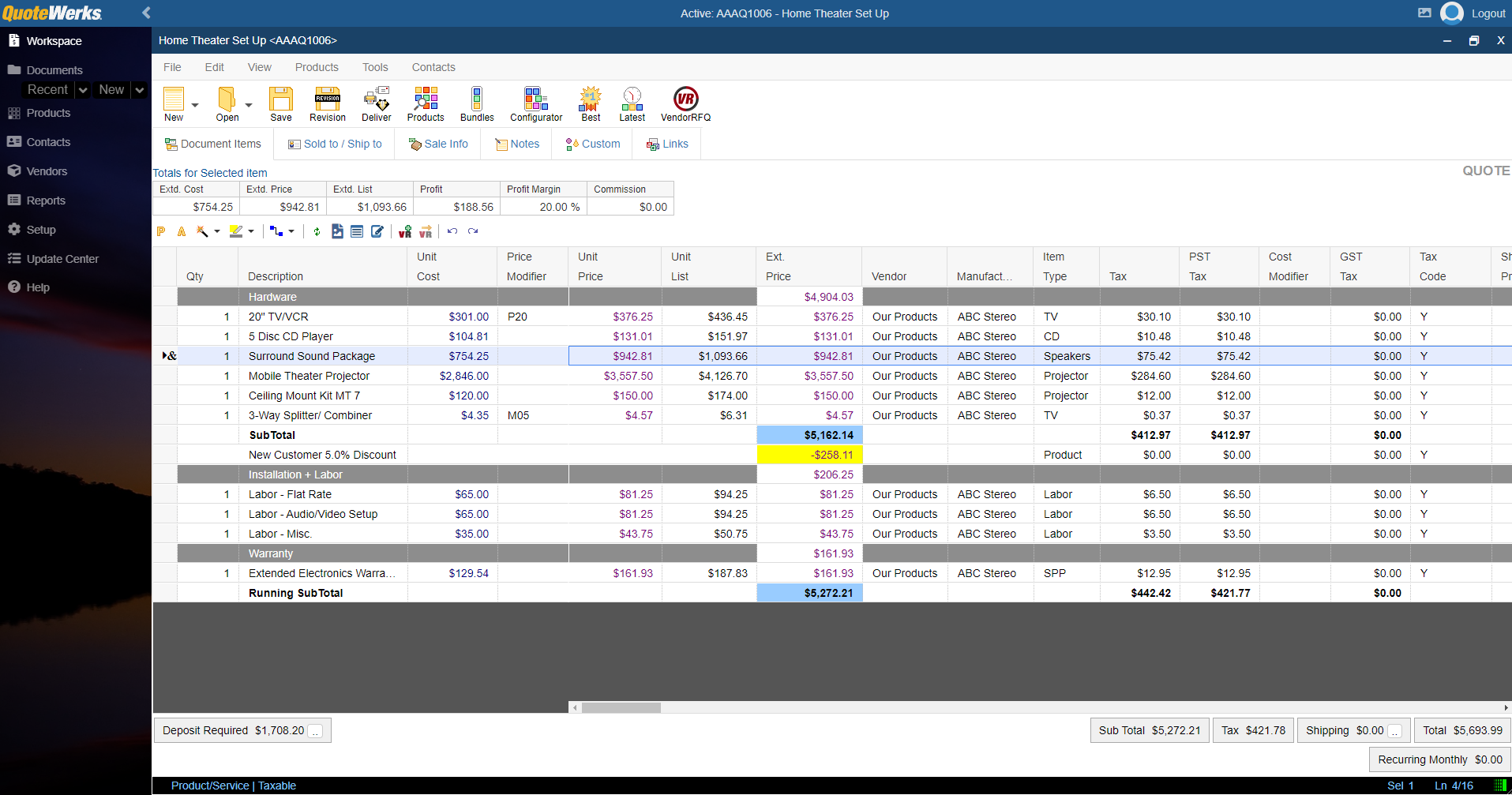
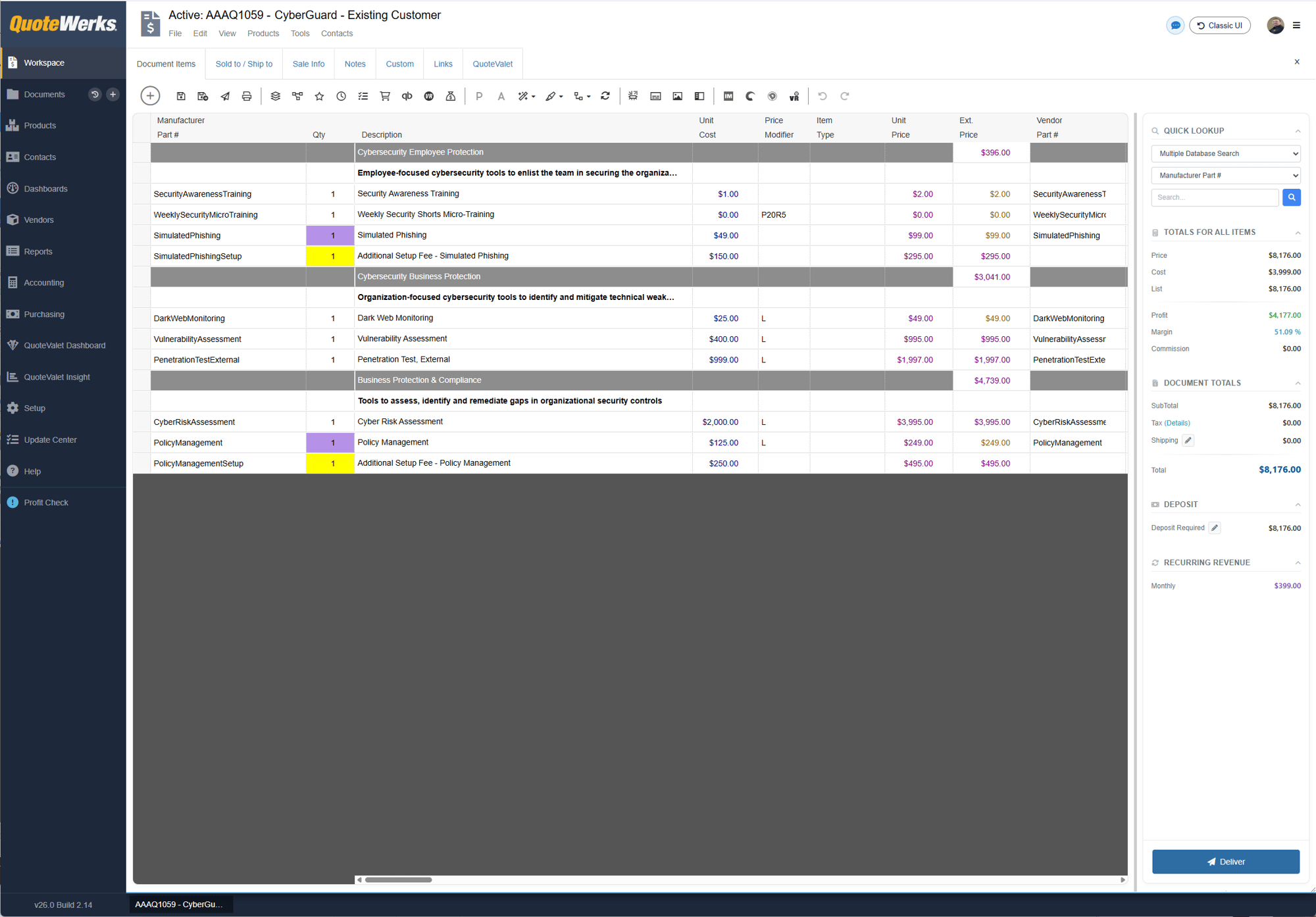
Experienced Desktop users can start with the familiar interface to ease the transition. Newer users, managers, or teams ready for a more modern experience can use the newer Web interface.
The result is a smoother migration path:
- Existing users do not have to abandon familiar workflows immediately
- New users get a more modern Web experience
- Teams can transition at a realistic pace
- Businesses can modernize the interface without creating unnecessary disruption
This is one of the reasons QuoteWerks Web is a practical step forward for Desktop customers. It respects the way existing users already work while giving the business a modern Web experience to grow into.
The Way Teams Work Has Changed
QuoteWerks Desktop has served businesses well for decades and continues to do so. It remains a powerful quoting solution, especially for companies with established workflows, advanced integrations, and desktop-based processes.
But the environment around sales teams has changed.
Salespeople are not always working from the same office, same workstation, or same network. Teams may include inside sales, field sales, remote employees, hybrid workers, managers, finance users, customer success teams, and operations staff who all need some level of visibility into quoting activity.
At the same time, IT teams are being asked to reduce complexity, improve security, simplify onboarding, and keep business applications current with less manual effort.
A Desktop-only quoting environment can still work. But it often requires more coordination:
- Local workstation setup
- VPN or remote access configuration
- Manual software updates
- Version management across users
- More dependency on specific machines or environments
- More IT involvement when users change roles, devices, or locations
None of those issues automatically mean you need to abandon Desktop.
But they do create friction.
QuoteWerks Web helps remove that friction by giving your team browser-based access to QuoteWerks while allowing you to move at a pace that makes sense.
You Do Not Have to Replace Desktop on Day One
One of the biggest misconceptions is that moving to QuoteWerks Web means leaving QuoteWerks Desktop behind immediately.
That is not the case.
QuoteWerks customers have options.
You can continue using QuoteWerks Desktop. You can use QuoteWerks Desktop and QuoteWerks Web together. Or, if your business no longer needs Desktop-specific workflows, you can move fully into QuoteWerks Web.
Many existing customers begin with a hybrid approach.
They continue using QuoteWerks Desktop where it still makes sense, while adding QuoteWerks Web for users or workflows that benefit from browser-based access.
For example, your sales team may use QuoteWerks Web for day-to-day quoting, while accounting, operations, or administrators continue using QuoteWerks Desktop for workflows that are still tied to Desktop-specific capabilities.
This gives you the best of both worlds:
- Keep the workflows your team already trusts
- Add browser-based access where it solves immediate problems
- Reduce disruption during the transition
- Expand usage over time as your team becomes comfortable
- Avoid a forced “big bang” migration
That matters because most quoting environments are not simple.
They include pricing rules, product data, templates, approvals, CRM connections, customer history, accounting workflows, purchasing processes, and operational habits that have developed over years.
A controlled transition is usually better than a rushed replacement.
You Have Three Practical Paths
QuoteWerks does not force every customer into the same deployment model.
Most existing Desktop customers fall into one of three paths.
1. Continue Using QuoteWerks Desktop
This is the right fit for companies that still rely heavily on desktop-based workflows, deep integrations, Desktop API-based customizations, FPC layouts and reports, QuickBooks Desktop, or other accounting and back-office processes tied to locally installed software.
If Desktop is still the best fit for your current environment, you can continue using it.
2. Use QuoteWerks Desktop and QuoteWerks Web Together
This is the right fit for companies that want browser-based quoting for sales users while keeping Desktop available for accounting, administration, advanced layout or report work, sales reps who prefer Desktop, or desktop-specific integrations.
This hybrid approach allows your business to modernize the quoting experience without disrupting critical back-office workflows.
3. Move Fully to QuoteWerks Web
This is the right fit for companies that no longer need Desktop-specific capabilities and want the cleanest browser-based experience.
A dedicated QuoteWerks Web environment gives your team browser-based access, automatic Web updates, no local Desktop installation requirement, and access to newer Web-first functionality.
The right path depends on your workflows, integrations, users, and operational requirements.
The important point is that you have options.
Why Some Customers Still Keep QuoteWerks Desktop
QuoteWerks Web gives teams a modern browser-based quoting experience, but some customers still have good reasons to keep QuoteWerks Desktop in the workflow.
A common example is QuickBooks Desktop.
Many businesses still rely on QuickBooks Desktop for accounting, invoicing, purchasing, and back-office operations. For those companies, QuoteWerks Desktop may continue to play an important role because it supports workflows tied to the locally installed accounting system.
That is where a hybrid approach can make sense.
Sales users can create and manage quotes in QuoteWerks Web, while accounting or operations users continue using QuoteWerks Desktop for QuickBooks Desktop or other Desktop-specific workflows.
This lets the business modernize without breaking the back office.
Other examples may include desktop-based CRMs, third-party integrations built around the Desktop API, advanced FPC layout and report work, or established administrative processes that still make more sense in Desktop.
Over time, some companies may move more of their workflow into QuoteWerks Web. Others may continue using Desktop and Web together long term because it fits their operational reality.
The key is that QuoteWerks does not force an all-or-nothing decision.
You can keep Desktop where it still delivers value and expand Web where it solves real business problems.
QuoteWerks Desktop Development Continues
Moving toward QuoteWerks Web does not mean QuoteWerks Desktop is being abandoned.
QuoteWerks continues to develop QuoteWerks Desktop for customers who rely on Desktop-based workflows, integrations, accounting processes, and established operational environments.
At the same time, QuoteWerks Web continues to expand as the modern browser-based quoting platform with Web-first functionality, automation, easier access, and modern administration tools.
This is not an either/or product strategy.
It is a flexible path forward.
Some customers are ready to move fully into a dedicated QuoteWerks Web environment. Others will continue using QuoteWerks Desktop and QuoteWerks Web together because it fits their business, especially when accounting, integration, or administrative workflows still depend on Desktop.
The goal is not to push every customer into the same deployment model.
The goal is to help each customer modernize at the right pace while continuing to support the workflows they depend on today.
Your QuoteWerks Investment Moves Forward
A major reason now is the right time to evaluate QuoteWerks Web is that this is not a rebuild-from-scratch scenario.
QuoteWerks Web is designed to extend your existing QuoteWerks environment. Your core quoting foundation can carry forward, including:
- Product catalogs
- Pricing and supplier data
- Customer quotes and quote history
- Quote revisions
- System settings
- Tax rules
- Pricing logic
- Contact and customer data
- Document templates and branding
That reduces the risk normally associated with moving from one quoting platform to another.
With many CPQ or proposal tools, migration means recreating your product database, rebuilding templates, retraining users, and rethinking workflows inside an entirely different system.
QuoteWerks Web takes a different approach.
You are not throwing away the system your business already depends on.
You are extending it.
Web-Only Functionality Creates New Opportunities
QuoteWerks Web is not just QuoteWerks Desktop in a browser.
It brings forward the QuoteWerks foundation customers already know while adding newer capabilities designed for modern sales teams, administrators, and connected business systems.
Familiar Desktop-Style Interface
Existing Desktop users can begin in a familiar QuoteWerks Web experience with a toolbar and workflow designed to feel closer to QuoteWerks Desktop.
This helps reduce the learning curve and makes adoption easier for users who already know QuoteWerks.
Modern Web Interface
QuoteWerks Web also includes a newer, modern interface for teams that want a cleaner, more browser-native experience.
This gives businesses a path to modernize the user experience without forcing every user into the same change at the same time.
AI-Powered Paste Special
QuoteWerks Web can help parse and map pasted content, such as spreadsheet rows or unstructured text, into quote line items. This can reduce manual entry and speed up quote creation.
AI Scripting
AI-assisted scripting can help tailor workflows, perform calculations, add line items, validate line item data, and automate parts of the quoting process.
Outbound Webhooks
QuoteWerks Web supports outbound webhooks, allowing document events such as creation, updates, and status changes to trigger notifications or workflows in other systems.
This opens the door to more connected quote-to-cash workflows, including alerts, CRM updates, reporting actions, and other operational automations.
REST and OData APIs
Modern API and reporting access helps businesses connect QuoteWerks Web data to tools such as Microsoft Power BI and other reporting platforms.
Settings Search
With spotlight-style search across more than 500 system, site, and user settings, administrators can find the settings they need faster instead of digging through menus.
Centralized Email Template Manager
QuoteWerks Web includes a centralized area for managing templates, snippets, signatures, and system templates. This helps teams standardize customer communication and reduce template sprawl.
Azure AD / Entra ID Single Sign-On
Support for Microsoft Azure AD / Entra ID authentication allows users to sign in using existing corporate credentials.
Rich Text Formatting
QuoteWerks Web supports rich text formatting in selected fields, allowing users to create clearer and more polished quote content with formatting such as bold text, italics, and lists.
Faster Layout Designer
The QuoteWerks Web Layout Designer provides faster preview and output generation, making it easier to refine customer-facing quote documents.
Enhanced Image Support
QuoteWerks Web supports more image formats, larger image files, and a shared image pool across users in the organization.
These capabilities matter because they move QuoteWerks beyond traditional quote creation and into a more connected sales operations environment.
Automatic Updates Reduce Operational Drag in Dedicated Web Environments
One of the long-term advantages of moving fully into a dedicated QuoteWerks Web environment is automatic Web updates.
That can reduce the operational burden that comes with managing installed desktop software, including local workstation updates, version coordination, and manual rollout planning.
Customers operating in a dedicated QuoteWerks Web environment benefit from automatic Web updates.
Customers using QuoteWerks Desktop or a Desktop/Web hybrid environment still need to maintain and update their QuoteWerks Desktop installation separately.
That distinction matters.
Automatic updates are a strong long-term benefit for customers moving fully into QuoteWerks Web, but they should not be positioned as a benefit of a Desktop/Web hybrid setup.
For hybrid customers, the value is flexibility. Sales users can gain browser-based access and Web-only functionality, while Desktop remains available for the workflows that still require it.
For dedicated Web customers, the value is simplicity. The team can operate in a browser-based environment without managing local Desktop installations.
The Broader IT Timing Makes Sense
Many companies are already reviewing workstations, Windows versions, remote access, security requirements, and application deployment strategies.
That broader IT review creates a natural opportunity to evaluate QuoteWerks Web.
With Microsoft support for Windows 10 having ended on October 14, 2025, many businesses are already reassessing workstations, operating system standards, remote access requirements, and the applications that still depend on locally installed software.
That does not mean QuoteWerks Desktop is going away. It does not mean every company needs to move fully to Web immediately.
But it does mean many companies are already asking practical questions:
- Which applications still need local installation?
- Which users need browser-based access?
- Which workflows depend on VPNs or remote desktops?
- Where can IT reduce workstation-specific setup?
- Which tools should be part of a long-term modernization plan?
If your business is already reviewing PCs, infrastructure, remote access, or cloud-based applications, it is also a good time to evaluate where QuoteWerks Web fits into your quoting environment.
QuoteWerks Web Helps New Users Get Started Faster
Hiring, onboarding, and role changes are easier when users do not need a full Desktop environment configured before they can start quoting.
With browser-based access, new users can get into QuoteWerks Web more quickly.
This is especially helpful for:
- New sales reps
- Remote team members
- Field sales users
- Managers who need visibility but do not create quotes every day
- Customer success or operations users who need access to quote information
- Temporary or expanding teams
This does not eliminate the need for training.
Users still need to understand your pricing, approval rules, product structure, customer expectations, and sales process.
But it removes unnecessary setup friction.
That is the real benefit.
QuoteWerks Web does not just modernize the user interface. It makes the quoting environment easier to deploy and support.
Start Where the Friction Already Exists
The best way to move from QuoteWerks Desktop to QuoteWerks Web is not to move everything at once.
Start where Web solves an obvious problem.
Common starting points include:
- Sales reps who need browser-based access
- Remote users who currently depend on VPN access
- Field sales teams quoting on-site with customers
- New hires who need faster setup
- Managers who need quote visibility without a full Desktop setup
- Teams that want a more modern user experience
- Users who benefit from AI Paste Special, rich text, Settings Search, webhooks, or the newer Layout Designer
This keeps the rollout focused.
Instead of asking:
“When should we move everyone to Web?”
Ask:
“Where is Desktop creating the most friction today?”
That answer usually gives you the right first use case.
What to Review Before Moving
Before enabling QuoteWerks Web, it is worth reviewing your current environment.
Important questions include:
- Which edition of QuoteWerks Desktop are you using?
- Are you current on your maintenance?
- How many users need Web access at the same time?
- Which users should start in Web first?
- Which workflows should remain in Desktop for now?
- Which integrations are business-critical?
- Are you using QuickBooks Desktop, QuickBooks Online, CRM integrations, PSA integrations, or third-party tools?
- Are you using Desktop API-based integrations?
- Are you using FPC layouts or reports that need Desktop access?
- Is your database hosted in a way that supports Web access?
- Would a QuoteWerks-hosted database simplify your environment?
- Do you want a short-term hybrid setup or a longer-term move toward Web?
These questions should not slow you down.
They simply help define the right path.
For many customers, the first step is a focused review with the QuoteWerks team to determine whether Desktop-only, hybrid, or dedicated Web is the right fit.
Why Now?
The timing is right for four reasons.
First, QuoteWerks Web has reached feature parity for the core quoting workflows most Desktop customers rely on every day.
Second, QuoteWerks Web now adds functionality beyond Desktop. That includes two interface options: a familiar Desktop-style experience designed to ease migration for existing customers, and a newer modern Web interface for users who want a cleaner, browser-native experience. QuoteWerks Web also adds AI-powered Paste Special, AI-assisted scripting, outbound webhooks, REST and OData APIs, Settings Search, centralized email template management, enhanced image support, and Azure AD / Entra ID single sign-on.
Third, business technology expectations have changed. Teams expect browser-based access, easier onboarding, modern authentication, cleaner administration, and better connectivity between sales, quoting, reporting, and operations.
Fourth, customers do not need to take unnecessary risk. QuoteWerks Web is designed to extend the existing Desktop foundation instead of forcing customers to rebuild their quoting process from scratch.
That combination is why now is different.
You are not being asked to abandon what works.
You are being given a path to modernize without starting over.
The Bottom Line
If QuoteWerks Desktop is working for your business, that is a strength, not a weakness.
But the timing has changed.
QuoteWerks Web has reached feature parity for the core quoting workflows most teams rely on, and it now adds Web-only capabilities that help teams quote faster, automate more, simplify access, and connect quoting data to the rest of the business.
It also gives customers two interface options: a familiar Desktop-style experience for easier migration and a modern Web interface for teams ready for a cleaner browser-based experience.
At the same time, QuoteWerks Desktop development continues, and Desktop remains important for customers who depend on desktop-based integrations, accounting workflows, FPC layouts and reports, Desktop API integrations, and established operational processes.
That is the point.
This is not an all-or-nothing decision.
You can keep Desktop where it still delivers value and expand Web where it solves real business problems.
Start small. Choose the users or workflows where Web removes friction. Keep Desktop where it still matters. Expand when the business case is clear.
QuoteWerks Web gives existing Desktop customers a practical modernization path without forcing a disruptive migration.
That is why now is the right time to take the next step.
Ready to see how QuoteWerks Web fits your existing QuoteWerks Desktop environment?
Talk with the QuoteWerks team to review your current setup, identify the best starting point, and determine whether Desktop-only, hybrid, or dedicated QuoteWerks Web is the right path for your business.
FAQ About Moving to QuoteWerks Web
Does QuoteWerks Web have the same features as QuoteWerks Desktop?
QuoteWerks Web has reached feature parity for the core quoting workflows most customers rely on every day.
It also adds Web-only and Web-first capabilities such as AI-powered Paste Special, AI-assisted scripting, outbound webhooks, REST and OData APIs, Settings Search, centralized email template management, enhanced image support, and Azure AD / Entra ID single sign-on.
Some customers may still keep QuoteWerks Desktop for Desktop-specific workflows such as QuickBooks Desktop, desktop-based integrations, FPC layouts and reports, advanced administrative needs, or third-party integrations built around the Desktop API.
Does QuoteWerks Web look like QuoteWerks Desktop?
QuoteWerks Web supports two user experiences.
For existing QuoteWerks Desktop users, QuoteWerks Web includes a familiar interface option with a toolbar experience designed to feel closer to QuoteWerks Desktop. This helps reduce training friction and makes the transition easier for experienced users.
QuoteWerks Web also includes a newer, more modern Web interface for users who want a cleaner, browser-based experience. This gives teams flexibility: existing users can start with a familiar layout, while newer users or teams ready for a modern UI can use the newer Web experience.
Do I have to stop using QuoteWerks Desktop to use QuoteWerks Web?
No. Many existing customers use QuoteWerks Desktop and QuoteWerks Web together.
This allows teams to keep established Desktop workflows while adding browser-based access for users or departments that need more flexibility.
Why would we still use QuoteWerks Desktop after adopting QuoteWerks Web?
Some businesses still need QuoteWerks Desktop for specific workflows, especially QuickBooks Desktop, desktop-based accounting systems, desktop-based CRMs, advanced FPC layout and report work, administrative workflows, or third-party integrations built around the Desktop API.
In those cases, QuoteWerks Web can be used for browser-based quoting and sales workflows, while QuoteWerks Desktop remains available for accounting, administration, or integration-specific needs.
This hybrid approach lets companies modernize the quoting experience without disrupting important back-office processes.
Can we use QuoteWerks Web if we still use QuickBooks Desktop?
Yes. Customers using a hybrid QuoteWerks Desktop and QuoteWerks Web environment can still use the QuickBooks Desktop integration through QuoteWerks Desktop.
A common workflow is for sales users to handle quoting activity in QuoteWerks Web while accounting uses QuoteWerks Desktop for the QuickBooks Desktop integration.
Is QuoteWerks Desktop still being developed?
Yes. QuoteWerks Desktop development continues.
QuoteWerks Desktop remains important for customers who rely on Desktop-based workflows, accounting integrations, desktop-based CRMs, FPC layouts and reports, third-party Desktop API integrations, and established operational processes.
QuoteWerks Web gives those customers a modern path forward without requiring an immediate all-or-nothing move.
Does QuoteWerks Web have automatic updates?
Yes. Customers operating in a dedicated QuoteWerks Web environment benefit from automatic Web updates.
Customers using QuoteWerks Desktop or a Desktop/Web hybrid environment still need to maintain and update their QuoteWerks Desktop installation separately.
For that reason, automatic updates are best understood as a benefit of moving fully into a dedicated QuoteWerks Web environment, not as a benefit of a hybrid Desktop/Web setup.
Will my existing quotes and customer history move to QuoteWerks Web?
QuoteWerks Web is designed to extend your existing QuoteWerks environment.
Existing quotes, customer history, product data, pricing logic, templates, and settings can carry forward, helping reduce the disruption normally associated with changing quoting systems.
Who should start using QuoteWerks Web first?
The best starting point is usually the group already experiencing the most friction.
This may include remote users, field sales reps, new hires, managers who need quote visibility, or users who would benefit from browser-based access, modern Web-only functionality, and simplified deployment.
Is QuoteWerks Web a complete replacement for QuoteWerks Desktop?
It can be for some businesses, but it does not have to be.
Some customers may eventually move fully to a dedicated QuoteWerks Web environment. Others may continue using QuoteWerks Desktop and QuoteWerks Web together long term.
The right path depends on your workflows, integrations, accounting requirements, administrative needs, and business goals.