
The Real Cost of “Just One More Spreadsheet” in the Sales Process
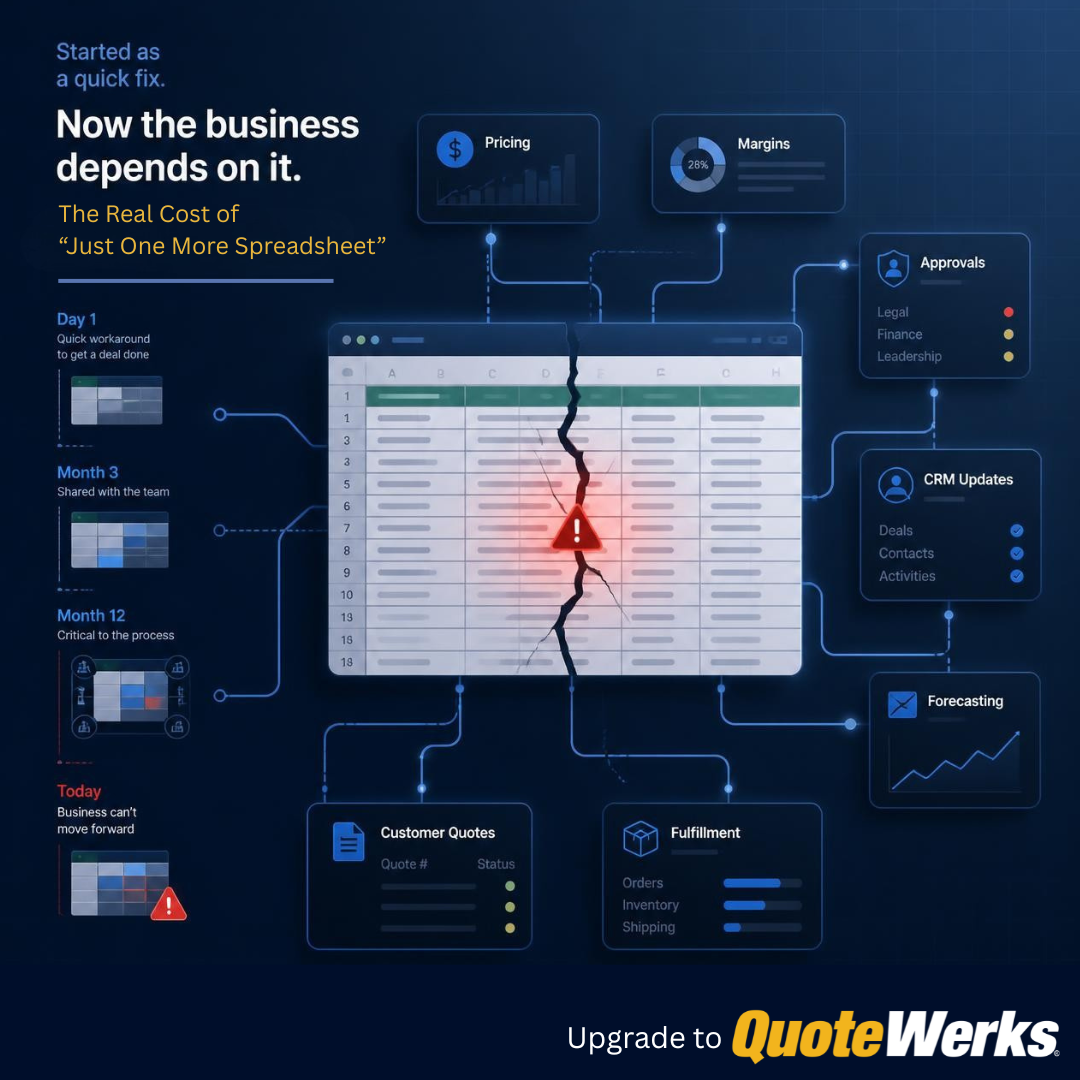
Nobody sets out to build a sales process around a chaotic collection of spreadsheets.
It usually starts with one reasonable decision.
A salesperson needs a faster way to calculate margin, so someone builds a quick tool.
Pricing arrives from a vendor in an odd format, so another spreadsheet appears.
An approval bottleneck slows down a deal, so someone creates a tracker.
Each decision solves an immediate problem. Spreadsheets are fast, familiar, and flexible.
But eventually, the temporary pricing calculator gets used on every quote. The approval tracker becomes the only place to see which deals are waiting. The person who built the margin spreadsheet becomes the person everyone calls when a formula breaks.
Without anyone formally deciding it, the spreadsheet has quietly become part of the company's infrastructure.
That is when “just one more spreadsheet” starts becoming expensive.
The real cost is not the spreadsheet itself. It is the operating debt created when pricing logic, approvals, customer commitments, and other critical sales processes begin depending on a file that was never designed to become infrastructure.
Spreadsheets Are Not the Problem
Let's clear the air: spreadsheets are incredibly useful.
Microsoft Excel and Google Sheets are excellent tools for:
- One-time data analysis and financial modeling.
- Data cleanup, imports, and exports.
- Ad hoc calculations.
- Testing new ideas and processes.
- Solving an immediate operational need before a formal system exists.
The problem is not the tool.
It is unconscious permanence: a temporary workaround becomes a permanent process without anyone stopping to decide whether it still makes sense.
A spreadsheet that worked beautifully for one person handling ten quotes a month can quietly evolve into the primary pricing engine, margin calculator, approval system, and operating record for an entire sales team.
There is rarely a clear moment when this happens.
The spreadsheet does not suddenly announce that it has become mission-critical.
It just keeps getting used.
When a Workaround Quietly Becomes Infrastructure
Official business systems are easy to identify.
Your CRM manages customer relationships and opportunities.
Your accounting software manages financial transactions.
Your PSA or ERP may manage service delivery, procurement, or operations.
But your actual sales workflow might also depend on files named:
Master Pricing Calculator - FINAL v7.xlsxQuote Margin Tool - USE THIS ONE.xlsx2026 Sales Approval Tracker.xlsx
The names may be amusing, but the risk is real.
These files may now determine:
- Which product cost gets used.
- How margin is calculated.
- Which discounts a salesperson can offer.
- Whether management approval is required.
- What price the customer sees.
- What information gets entered into the CRM.
- What operations receives after the sale.
The spreadsheet has become mission-critical without anyone ever deciding to make it mission-critical.
And unlike an official business system, it may have:
- No clear owner.
- No documented business rules.
- No reliable change history.
- No controlled workflow.
- No integration with the other systems involved in the sale.
There is a major difference between using a spreadsheet and depending on one.
Where Spreadsheet Dependency Gets Expensive
A broken formula or manual data-entry mistake can be expensive.
But the structural costs of spreadsheet dependency are usually harder to see and more difficult to fix.
1. Business Logic Becomes Invisible
Over time, a spreadsheet can accumulate far more than rows and columns.
It may contain:
- Pricing formulas.
- Margin requirements.
- Discount thresholds.
- Lookup tables.
- Customer-specific exceptions.
- Hidden columns.
- Macros.
- Notes that only make sense to the person who created them.
At that point, the spreadsheet is no longer just storing data.
It is running part of the business.
Who owns that logic?
Who can answer:
- Why is this product marked up differently?
- Which cost field are we using?
- Who changed the discount calculation?
- Does this formula still reflect current company policy?
- Why does one salesperson's quote calculate differently from another's?
When pricing rules and business policies exist only inside formulas and hidden tabs, the company is effectively running on undocumented software.
The risk is not simply that a formula might break.
The deeper risk is that the business rules can change without anyone realizing the process itself has changed.
2. Multiple Versions of the Truth
A spreadsheet-dependent sales process often requires a chain of manual handoffs.
A salesperson may:
- Find the customer in the CRM.
- Copy the customer information into a spreadsheet.
- Look up products and vendor costs somewhere else.
- Calculate pricing and margin.
- Move the final numbers into a quote or proposal.
- Send the quote to the customer.
- Update the CRM.
- Re-enter the approved sale into accounting, a PSA, an ERP, or another operational system.
Each individual step may seem minor.
Together, they create multiple opportunities for:
- Duplicate entry.
- Transcription mistakes.
- Delays.
- Version drift.
- Missing information.
- Confusion about which number is current.
This is how a company ends up with three different values for the same deal.
The CRM says $50,000.
The pricing spreadsheet says $57,000.
The quote the customer actually received says $54,500.
Which one is the truth?
The more times people have to move information manually, the more opportunities there are for the truth to change along the way.
3. The Illusion of Management Visibility
Leadership opens the CRM dashboard and sees:
- Opportunity value.
- Deal stage.
- Expected close date.
- Forecast.
- Pipeline coverage.
The reports look clean.
But what if the real work is happening somewhere else?
The salesperson may have:
- Changed the product configuration.
- Added optional items.
- Revised the pricing.
- Reduced the margin.
- Sent a new version to the customer.
- Agreed to different terms.
If those changes exist in a spreadsheet or local quote file but have not made their way back into the CRM, leadership is making decisions based on incomplete information.
The report may be technically accurate based on the data inside the CRM.
It can still be operationally wrong.
When critical sales work happens outside the systems leadership can see, reporting becomes a polished view of incomplete information.
That is not just an efficiency problem.
It is a decision-quality problem.
Your CRM may still be the official source of truth. But if the information inside it depends on someone manually copying data from a spreadsheet, the CRM is only as current as the last person who remembered to update it.
4. Key-Person Risk
There is usually one person who truly understands the spreadsheet.
They know:
- Which tabs actually matter.
- Which cells should never be touched.
- Which formulas occasionally break.
- Which version is current.
- Which customers require special handling.
- Which workaround fixes the other workaround.
That person's knowledge can keep the process functioning for years.
It can also hide how fragile the process has become.
Ask a simple question:
What happens when that person is unavailable?
Can someone else:
- Understand the formulas?
- Update the pricing sources?
- Fix a broken lookup?
- Explain why an exception exists?
- Safely modify the file?
- Train a new salesperson to use it correctly?
If sales velocity drops because the spreadsheet expert is on vacation or has left the company, the spreadsheet is no longer just a tool.
It is a single point of failure.
5. Complexity Compounds as the Team Grows
A manual process can work surprisingly well at a small scale.
Two salespeople may be able to coordinate around:
- One pricing sheet.
- A shared folder.
- A few vendors.
- Simple approvals.
- A manageable number of quotes.
Then the business grows.
There are more salespeople.
More quotes.
More vendors.
More customer-specific pricing.
More recurring revenue.
More approvals.
More people involved after the sale.
The problem is not simply that the spreadsheet gets larger.
Every new person, handoff, exception, and data source creates another place where the process can diverge.
One salesperson copies the template.
Another creates a new version.
Someone adds a column.
Someone else updates a formula in only one copy.
A new rep learns the process from another rep instead of from a documented workflow.
What once felt flexible becomes inconsistent.
The cost of a workaround does not always grow in a straight line. Complexity compounds as more people and processes depend on it.
The Spreadsheet Is a Symptom, Not the Root Cause
It is easy to blame Excel or Google Sheets.
That misses the point.
Most spreadsheet workarounds exist because someone needed to solve a real problem.
Perhaps:
- The CRM could not handle the quoting process.
- Vendor pricing was scattered across too many sources.
- Approvals were too slow.
- The existing system was too rigid.
- Nobody wanted to wait for a software change.
- The team needed flexibility.
The spreadsheet was often a rational response.
That matters because simply banning spreadsheets does not fix the process.
Take the file away without solving the underlying problem, and the team will create another workaround.
Maybe it moves into:
- Email.
- Internal chat.
- Shared documents.
- Personal notes.
- Another spreadsheet with a different name.
The goal should not be to eliminate the file.
The goal should be to understand what job the file is performing and decide whether that job has become important enough to deserve a real process.
Not Every Spreadsheet Needs to Be Replaced
Some spreadsheets should remain spreadsheets.
A spreadsheet is still a good fit when the work is temporary, exploratory, or one-time.
Use one to:
- Model a new idea.
- Clean up data.
- Compare scenarios.
- Investigate a problem.
- Test a new process before formalizing it.
The warning sign is not that your business uses spreadsheets.
Almost every business does.
The warning sign is that a recurring, customer-facing process now depends on one.
The question is not whether the spreadsheet works. It is whether the work has become too important for the business to depend on a file.
How to Know Your Sales Process Has Outgrown Spreadsheets
A spreadsheet is becoming business infrastructure when several of these statements are true:
- Multiple employees depend on the same file regularly.
- It affects customer-facing pricing, discounts, margins, or commitments.
- It contains important formulas, business rules, or approval logic.
- Data must be manually copied into or out of other business systems.
- Multiple current versions of the file regularly exist.
- The business needs to know who changed what and when.
- The process slows down when the spreadsheet owner is unavailable.
The more boxes you check, the less this is about whether spreadsheets are good or bad.
It is about whether the process has outgrown the tool.
Once several of these warning signs appear, the question is no longer whether spreadsheets are useful. It is whether the workflow has become too important to depend on one.
We explored what the practical next step can look like in Outgrowing Excel? QuoteWerks Helps Teams Create Quotes, Manage Orders, and Streamline QuickBooks Workflows.
Move the Process, Not Just the Data
One of the biggest mistakes companies make when moving away from Excel is recreating the exact same manual process inside a different application.
The spreadsheet disappears.
The workflow does not improve.
Employees still:
- Re-enter customer information.
- Search multiple places for pricing.
- Copy products between systems.
- Request approvals through email.
- Manually update the CRM.
- Recreate the order after the customer says yes.
That is not process improvement.
It is a new interface for the old problem.
Before replacing a spreadsheet, ask:
- What job is this spreadsheet performing?
- Which information does it contain or own?
- Where does that information come from?
- Who needs the information next?
- Which rules or approvals are hidden inside the file?
- Which manual handoffs can be removed?
- Which other business systems should be connected?
The goal is not to digitize the workaround.
The goal is to redesign the workflow so the workaround is no longer necessary.
How QuoteWerks Replaces Quote-Critical Spreadsheet Work
QuoteWerks does not exist to eliminate every spreadsheet from your business.
It is designed to move repeatable, quote-critical work into a structured process.
Instead of copying customer data, products, pricing, margins, and approvals between disconnected files, QuoteWerks can help teams:
- Work with customer and opportunity information from CRM and PSA systems.
- Centralize the products and services used in quotes.
- Calculate pricing, discounts, totals, and margins inside the quoting process.
- Route quotes for approval based on defined business rules.
- Track quote revisions and history without relying on duplicated files.
- Give salespeople and leadership visibility into active quotes.
- Connect approved sales to accounting, purchasing, and downstream workflows.
The exact workflow varies by company.
A business selling standardized services may have different requirements from a company sourcing products from multiple distributors.
A growing SMB may need to move beyond Excel without taking on a major ERP implementation.
An established sales team may already have a CRM and need a quoting system that works with it instead of creating another disconnected process.
The goal is not simply to replace an Excel file with another application.
It is to remove the manual handoffs and hidden business logic that made the spreadsheet necessary in the first place.
The Goal Is Not Zero Spreadsheets
There will probably always be another spreadsheet.
And that is fine.
Someone will need to:
- Model a new pricing idea.
- Analyze historical sales.
- Clean up a data import.
- Compare scenarios.
- Investigate a problem.
Spreadsheets remain excellent tools for that kind of work.
The danger begins when a temporary analysis tool quietly becomes the permanent system responsible for pricing customers, protecting margins, approving deals, or handing commitments to the rest of the business.
At that point, the spreadsheet is no longer free.
The cost shows up somewhere else:
- In manual work.
- In inconsistent information.
- In weak visibility.
- In key-person dependency.
- In slower onboarding.
- In mistakes and rework.
- In processes that become harder to change as the company grows.
The goal is not to eliminate spreadsheets.
It is to stop making spreadsheets responsible for work that has become too important to remain invisible.
Has Your Quoting Process Outgrown Spreadsheets?
If your quoting process depends on pricing files, manual approvals, duplicated data, or one person who knows how everything works, it may be time for a more structured approach.
See how QuoteWerks helps move quote-critical work into a connected process without requiring you to replace the CRM, accounting system, PSA, or other business systems you already rely on.
Frequently Asked Questions about Spreadsheets in the Sales Process
Are spreadsheets bad for sales processes?
No. Spreadsheets are excellent for one-time analysis, financial modeling, data cleanup, ad hoc calculations, and testing new ideas. The risk begins when a recurring, customer-facing sales process becomes dependent on a spreadsheet that was originally created as a temporary workaround.
What is spreadsheet dependency in a sales process?
Spreadsheet dependency occurs when critical sales activities rely on spreadsheets to continue operating. Examples include pricing, margin calculations, discount rules, approvals, quote creation, CRM updates, or downstream handoffs that cannot happen reliably without a particular file.
When does a spreadsheet become business infrastructure?
A spreadsheet has effectively become business infrastructure when multiple people depend on it regularly, it contains important business rules, it affects customer commitments, or the process slows down when the spreadsheet or its owner is unavailable.
What are the biggest risks of using Excel or spreadsheets for quoting?
The biggest risks include invisible business logic, multiple versions of the same information, manual data-entry errors, outdated CRM records, key-person dependency, limited change history, and inconsistent processes as the sales team grows.
How can spreadsheet-based quoting affect CRM data?
When pricing, quote revisions, margins, and customer decisions happen outside the CRM, someone usually has to update the CRM manually. If that update is delayed or missed, pipeline values, forecasts, and opportunity information may no longer reflect what is actually being quoted to the customer.
How do spreadsheets create key-person risk?
Spreadsheet-based processes often depend on the person who created the file or understands its formulas, exceptions, and workarounds. If that person is unavailable, other employees may struggle to update the file, fix problems, or continue the process safely.
How do I know when my sales process has outgrown spreadsheets?
Common warning signs include multiple employees depending on the same file, customer-facing pricing or margins being calculated in spreadsheets, important business rules hidden in formulas, manual copying between systems, multiple current versions, limited change history, and a process that slows down when one person is unavailable.
Should every business spreadsheet be replaced?
No. Spreadsheets remain excellent tools for temporary, exploratory, and one-time work. The goal is not to eliminate spreadsheets. The goal is to move recurring, quote-critical processes into a more structured system when the business has become too dependent on the file.
Why isn't moving spreadsheet data into new software enough?
Simply recreating the same manual process in a different application does not solve the underlying problem. Businesses should first identify where data originates, who needs it next, which rules and approvals are hidden in the process, and which manual handoffs can be eliminated.
How does QuoteWerks help reduce spreadsheet dependency?
QuoteWerks moves repeatable, quote-critical work into a structured process. Teams can work with CRM and PSA information, centralize products and services, calculate pricing and margins, manage approvals, track quote revisions, improve quote visibility, and connect approved sales with downstream business systems.