Understanding QuoteWerks Line Types: What They Are and When to Use Them
When building a quote in QuoteWerks, it’s easy to think of every row as simply a product or service. But QuoteWerks gives you much more control than that.
Line types allow you to control how information is organized, calculated, displayed, and presented within a quote. Using the right line type can make a quote easier for your sales team to build and much easier for your customers to understand.
QuoteWerks currently provides nine primary line types:
- Product/Service
- Comment
- Subtotal
- Running Subtotal
- Percent Charge
- Percent Discount
- Heading
- Section Header
- Summary
Each serves a different purpose. Let’s take a closer look.
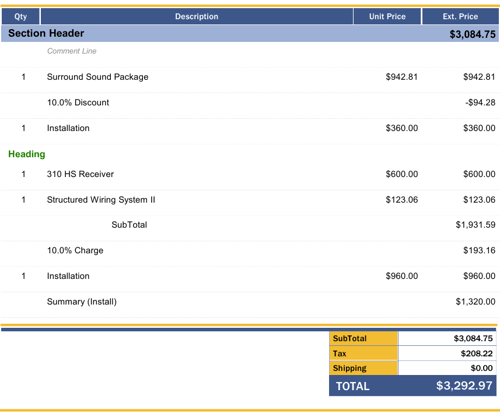
Product/Service Lines: The Foundation of Your Quote
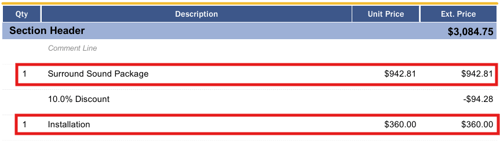
The Product/Service line is the most common line type in QuoteWerks. Whenever you add a product or service to a quote, it will typically use this line type by default.
Use Product/Service lines for anything you are actually selling or charging the customer for, such as:
- Hardware
- Software
- Installation services
- Consulting
- Support agreements
- Professional services
- Training
For example, an IT company might build a quote with:
10 × Business Laptops
10 × Microsoft 365 Licenses
10 × Laptop Setup Services
1 × Network Installation
Each of these would normally be a Product/Service line.
Product/Service lines can also support more advanced pricing scenarios, including formula-based pricing that calculates an item's price based on other items in the quote.
Best practice: Use Product/Service lines for anything that should contribute directly to the customer's quoted price.
Comment Lines: Add Context Without Affecting Pricing
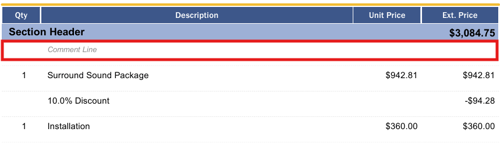
A Comment line is designed for descriptive text rather than something you are charging the customer for.
Comments are useful when you need to explain an item, add instructions, provide additional information, or simply create visual separation between groups of products.
For example:
Product: Cisco Network Switch
Comment: Includes configuration, installation, and testing.
You can also use a blank Comment line to create spacing between groups of items.
QuoteWerks allows you to add a comment below a selected item or insert one above an item, making comments particularly useful for organizing complex quotes.
Best practice: If the customer needs to understand why something is included or what it involves, consider using a Comment line.
Subtotal Lines: Break a Quote Into Meaningful Groups

A Subtotal line lets you total a specific group of line items within a quote.
The subtotal calculates the items between it and the previous Subtotal or Running Subtotal. If there isn't a previous subtotal, it can total the applicable items from the beginning of the quote.
For example, a technology quote might be structured like this:
Hardware
Server — $8,000
Network Switches — $2,000
Rack Equipment — $1,000
Hardware Subtotal — $11,000
Best practice: Use Subtotal lines when you want to show customers the cost of a particular group of products or services.
Running Subtotal Lines: Keep a Running Total
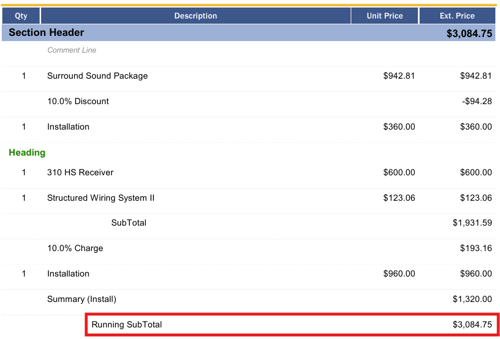
This can be particularly helpful for quotes that contain multiple stages, categories, or sections where you want to show the cumulative value as the quote progresses.
For example:
- Equipment — $10,000
- Installation — $2,000
- Running Subtotal — $12,000
- Training — $1,500
- Running Subtotal — $13,500
Best practice: Use Running Subtotals when the cumulative value of the quote is important to the sales process or customer.
Percent Charge Lines: Automatically Add a Percentage
A Percent Charge line allows you to add a charge calculated as a percentage of the line immediately above it.
For example, you might use a Percent Charge for:
- Shipping
- Handling
- Service fees
- Administrative charges
- Installation fees
- Other percentage-based charges
Suppose a project has a $10,000 subtotal and you need to apply a 5% service charge. A Percent Charge can calculate the additional $500 automatically.
One important detail: QuoteWerks calculates the Percent Charge based on the applicable line immediately above it, which can be a Product/Service, Subtotal, or Running Subtotal line.
Best practice: Use Percent Charge when the amount should automatically scale with the value of the preceding item or subtotal.
Percent Discount Lines: Apply Discounts Consistently
A Percent Discount line works similarly to a Percent Charge, but instead of adding money to the quote, it applies a percentage discount to the applicable line above it.
For example:
Hardware Subtotal: $20,000
10% Volume Discount: -$2,000
This makes discounts transparent and easy for customers to understand.
Percent Discount lines can be particularly useful for:
- Volume discounts
- Promotional discounts
- Customer-specific discounts
- Contract discounts
- Project-level discounts
QuoteWerks calculates the discount based on the applicable line immediately above it, which can be a Product/Service, Subtotal, or Running Subtotal.
Best practice: Use a Percent Discount line when you want the discount to remain tied to the value of the preceding item or subtotal.
Heading Lines: Organize Items Visually
A Heading line is primarily about organization and presentation.
Heading lines allow you to divide a quote into logical groups without creating a financial calculation.
For example, an office technology quote might use headings such as:
Workstations
-
Desktop Computers
-
Monitors
-
Keyboards and Mice
Networking
-
Network Switches
-
Wireless Access Points
-
Firewall
Services
-
Installation
-
Configuration
-
Training
Headings are especially useful when a quote contains many products and services and you want customers to quickly understand how everything is organized.
QuoteWerks also allows headings to be used with Bundles and Configurations.
Best practice: Use Heading lines when the primary goal is to improve readability and organization rather than perform calculations.
Section Header Lines: Organize and Automatically Subtotal
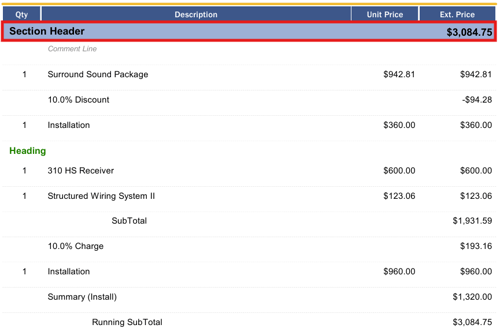
A Section Header takes organization a step further.
Section Headers allow you to create distinct sections within a quote and include a built-in subtotal (extended price) for the items underneath them. The section continues until another Section Header is encountered.
For example, a construction or technology project might be organized as:
SECTION: Phase 1 — Equipment - Section Total
- Server
- Switches
- Firewall
SECTION: Phase 2 — Installation - Section Total
- Installation Labor
- Configuration
- Testing
This makes Section Headers particularly useful for project-based quotes where the customer needs to see different phases, locations, departments, or categories.
They can also be combined with other line types, such as Headings and Subtotals, to create more sophisticated quote structures.
Best practice: Use Section Headers when you need clearly defined sections that should also have their own automatic totals.
Summary Lines: Show Totals Without Double-Counting

The Summary line type is one of the more specialized options in QuoteWerks.
Summary lines allow you to total multiple line items that meet specific matching criteria. For example, you could create a Summary line that totals all items with an Item Type of "Service."
This can be especially useful when you want to provide a customer with an overview such as:
Product Total: $25,000
Service Total: $8,000
Recurring Revenue: $2,000/month
The important distinction is that a Summary line's amount is not included in the overall quote total. In other words, it can summarize information without causing that amount to be counted twice.
Summary lines can also be used to reference a specific Section Header, making them useful for summarizing information within particular sections of a quote.
Best practice: Use Summary lines when you want to give customers or salespeople additional financial visibility without changing the actual quote total.
Why Line Types Matter
Well-structured quotes do more than calculate a price. They communicate value.
A quote with dozens of undifferentiated line items can be difficult for a customer to understand. Strategic use of headings, comments, sections, subtotals, and summaries can turn that same information into a professional proposal that clearly communicates what the customer is getting and how the price is constructed.
Line types can also help your sales team build quotes faster and more consistently. Instead of manually calculating charges, discounts, and totals, QuoteWerks can handle many of those calculations automatically.
And because line types can influence how information is presented in your layouts, they can play an important role in creating a polished customer-facing document.
Summary
QuoteWerks line types are more than formatting tools. They are building blocks for creating smarter, more readable, and more accurate quotes.
Start with Product/Service lines for what you're selling. Use Headings, Comments, and Section Headers to make the quote easier to understand. Add Subtotals and Running Subtotals to clarify pricing, and use Percent Charges and Discounts when calculations need to be automated. Finally, use Summary lines when you need to provide additional financial insight without affecting the quote's final total.
Once you understand how these line types work together, you can move beyond simply creating quotes and start designing quote documents that communicate your offering clearly and professionally.
If you have any questions, call us at 407-248-1481 to speak with one of our representatives today, available 9AM-5PM Eastern, Monday through Friday. You can also email us at sales@quotewerks.com or contact your QuoteWerks Reseller.
For international customers and technical support, click here.